Starfield Frame Generation - Replacing FSR2 with DLSS-G is a mod for Starfield, created by LukeFZ. If you like the mod then consider supporting its author through Patreon andbuymeacoffee.
Description:
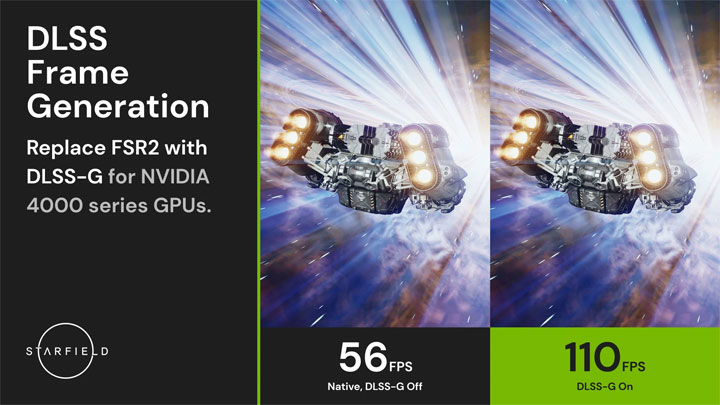
Replaces the built-in version of FSR2 with DLSS3 + DLSS-G to enable Frame Generation.
This mod replaces the game's native FSR2 implementation with DLSS along with implementing support for Frame Generation.
A built-in but optional sharpening pass is also provided through Nvidia Image Scaling (NIS).
IMPORTANT: While the Frame Generation portion of the mod requires a RTX 40-series graphics card to function, the rest can be used with any card that supports DLSS.
How to install:
- Download the latest release.
- Extract it into the game directory. (FSR2Streamline.asi along with the other files/folders from the zip should be in the same directory as Starfield.exe)
- Download both the latest DLSS and DLSS-G DLLs and place them in the 'streamline' folder in the game directory.
- Launch the game.
If you already have FSRBridge installed:
- Remove FSRBridge.asi from the game directory.
- (Optional) Remove the upscaler specific DLL (nvngx_dlss.dll/libxess.dll) from the game directory.
- Install this mod as normal, and overwrite all files when asked.
To get to your game directory:
- Xbox:
- Right click -> Click on 'Manage' -> Click on 'Files' -> Click on 'Browse...'
- Then go into the 'Starfield' folder, then 'Content' - you should now see 'Starfield.exe'.??
- Steam:
- Right click on the game in your library -> 'Manage' -> Click on 'Browse local files...'
- You should now see 'Starfield.exe'.
How to configure:
- Enable FSR2 (which is now replaced by DLSS) in the in-game settings.
- Use the regular in-game settings resolution slider and dynamic resolution option to configure DLSS.
- (Optional, only relevant if using the included sharpness pass) Use the sharpness slider to configure image sharpness.
- You can also adjust motion blur (I recommend halving it), film grain and others to improve image quality.
If you want to use ReShade and are having trouble with it, here are some troubleshooting steps you can try:
- IMPORTANT: Make sure to completely remove all other DLSS mods and ReShades you have installed.
- Install the latest version of this mod.
- Install ReShade 5.9.2 (the newest version) from the official ReShade website.
- During the installation, browse to your Starfield folder and select the following:
?- Steam users: Starfield.exe
?- Xbox users: gamelaunchhelper.exe
- Now you can install your desired ReShade presets or shaders.
- Turn off NIS sharpening in the config of this mod and enable Contrast Adaptive Sharpening in the ReShade effects.
- Last update: Tuesday, October 3, 2023
- Genre: RPG
- File size: 1.2 MB